Repeating Combined Fields Using a Sequence Field
This example demonstrates how you can make part of your regular expression repeat itself to match text of variable length, even if the repeated part is complex (meaning there’s no single RegexMagic pattern to match it). You can find this example as “Fields: sequence” in the RegexMagic library.
For this example, we’ll create a regex that verifies if a string holds a special kind of code. The code is delimited with angle brackets. Between those are 3 to 6 numbers ranging from 127 to 67301. The numbers are delimited by colons.
The description in the preceding paragraph is what you might read in a specification. Regular expressions can’t be written that way. Regular expressions work from left to right. Rewriting the spec from left to right, we have an opening angle bracket, followed by a number between 127 and 64301, followed by 2 to 5 times a colon and a number between 127 and 64301, followed by a closing angle bracket. While our rewritten spec is long-winded and perhaps less clear, writing it out or thinking it through this way makes it much easier to build the regular expression.
- Click the New Formula button on the top toolbar to clear out all settings on the Samples, Match, and Action panels.
- Set both “begin regex match at” and “end regex match at” to “anywhere”.
- Set the “field validation mode” to “strict”. We need to do this to make the integer pattern use the minimum and maximum values we specify.
- On the Samples panel, paste in one new sample:
<127:7898:1983>
<1234:789:18988:33891:9819>
<333:4444:55555:67301:1289:1081>
- Select the first < in the sample.
- Click the Mark button above the sample to mark the angle bracket as field
 . RegexMagic automatically detects the correct “literal text” pattern for this field.
- Select the number 127 right after the first angle bracket in the sample.
- Click the Mark button to mark the number as field
 . RegexMagic detects the “integer” pattern that we want, but not with all the right options as those can’t be guessed from marking just one number.
- On the Match panel, tick the “limit values” checkboxes among the settings for the integer pattern.
- In the edit control below that checkbox, enter “127..67301”.
- Back on the Samples panel, select : right after the number 127.
- Click the Mark button to add field
 . RegexMagic detects it as matching a literal colon.
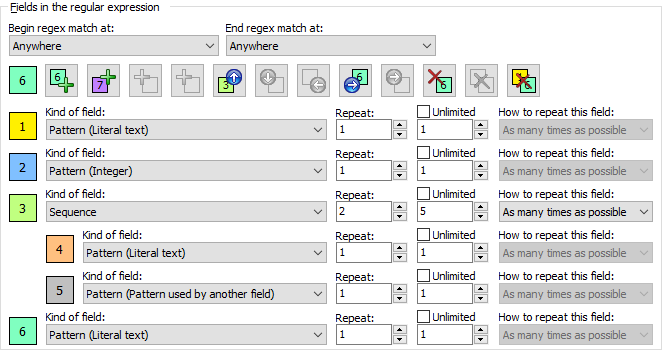
- Since our regex needs to match the colon 2 to 5 times together with another number, we stop marking fields on the Samples panel. To start the group, switch to the Match panel. Next to field , in the “kind of field” drop-down list, select “sequence”. This tells RegexMagic we want to repeat multiple fields as one unit. The old field that matches a literal colon is moved into the sequence as field
 .
.
- Set the “repeat this field” spinner controls for field to 2 and 5.
- Click the Add Last Sub-Field button
 to add field
  as the second field in the sequence under field .
- In the “pattern to match field” drop-down list, select “pattern used by another field”.
- In the “use pattern from the field” drop-down list, select field . This makes field match an integer between 127 and 67301 just as field does, though not necessarily the same integer.
- Click on the colored rectangle for field to make the field buttons work on that field.
- Click the Add Next Field button
 to add field
  after field , without making it a part of the sequence under field . Make sure not to confuse this button with the Add Last Sub-Field button
  which would make the new field part of the sequence.
- In the “pattern to match field” drop-down list, select “literal text”.
- Enter a > as the literal text that field should match.
- On the Regex panel, select “C# (.NET 2.0–7.0)” as your application, turn on free-spacing, and turn off mode modifiers. Click the Generate button, and you’ll get this regular expression:
<
(?:6730[01]|67[0-2][0-9]{2}|6[0-6][0-9]{3}|[1-5][0-9]{4}|[1-9][0-9]{3}|[2-9][0-9]{2}|1[3-9][0-9]|12[7-9])
(?:
:
(?:6730[01]|67[0-2][0-9]{2}|6[0-6][0-9]{3}|[1-5][0-9]{4}|[1-9][0-9]{3}|[2-9][0-9]{2}|1[3-9][0-9]|12[7-9])
){2,5}
>Required options: Free-spacing.
Unused options: Case sensitive; Dot doesn’t match line breaks; ^$ don’t match at line breaks; Numbered capture.
- The Samples panel now indicates our regex matches the code numbers. You’ll see that in each code number, all the colons are highlighted as field and the integers after them as field . No text is highlighted as field . That’s because the highlighting indicates which pattern matched which text. Field doesn’t match any text on its own. Its only purpose is to repeat fields and together.
<127:7898:1983>
<1234:789:18988:33891:9819>
<333:4444:55555:67301:1289:1081>
Related Examples
Reference