Matching Complex Unrelated Items Using Alternation of Sequences
This example demonstrates how you can generate a regular expression that matches two or more unrelated bits of text in a file, regardless of where or how many times each bit of text occurs in the file. The bits of text are complex, meaning multiple RegexMagic patterns must be placed in sequence to match them. You can find this example as “Fields: alternation sequence” in the RegexMagic library.
For this example, we’ll create a regex to finds all numbers and all email addresses in a file, with the numbers between square brackets and the email addresses between angle brackets. The regex matches should include the delimiters. To do this, we create a regex that matches a number between square brackets or an email address between angle brackets. When you repeat this regex using the “find all” command in an application or programming languages, you will get a list of all the numbers and email addresses with their delimiters.
- Click the New Formula button on the top toolbar to clear out all settings on the Samples, Match, and Action panels.
- Set both “begin regex match at” and “end regex match at” to “anywhere”.
- Set the “field validation mode” to “average”.
- On the Samples panel, paste in one new sample:
My favorite number is [42].
You can email me at <joe@fortytwo.com>.
Other nice numbers are [17], [382], and [794].
<joefortytwo@gmail.com> is my alternative email address.
- Select the first [ in the sample, immediately before the number 42 on the first line.
- Click the Mark button above the sample to mark the opening square bracket as field
 . RegexMagic automatically detects the correct “
 - literal text” pattern for this field.
- Select the number “42” in the sample.
- Click the Mark button to mark “42” as field
 . RegexMagic automatically detects the correct “integer” pattern for this field.
- Select the ] right after the number 42 that we just marked.
- Click the Mark button to mark the closing square bracket as field
 . Again we get the “literal text” pattern we want.
- Select the first < in the sample, immediately before “joe@fortytwo.com”.
- Click the Mark button to mark the opening angle bracket as a field. RegexMagic knows that because the angle bracket is not adjacent to the previous three fields we just marked, the only way a regex could match both is by using alternation. Thus, RegexMagic adds a new field with “kind of field” set to “alternation”. The first alternative is a new field , with “kind of field” set to “sequence”. The 3 fields we marked previously are placed under the sequence field, with their field numbers changed to ,
 , and
, and  . The new field to match the angle bracket is field
  , which is added as the second alternative under field .
-
- Select the email address “joe@fortytwo.com” in the sample.
- Click the Mark button to add a field for the email address. Since we’re marking this immediately after field , RegexMagic assumes that we always want the email address to follow immediately after the angle bracket. To accomplish this, RegexMagic adds a new field , with “kind of field” set to “sequence”. The field for the angle bracket becomes field
 as the first field in the sequence. Field
  is the new field for the email address.
- Select the > after the email address we just marked.
- Click the Mark button one more time to add field
 for closing angle bracket. Again, RegexMagic assumes that we always want the angle bracket to follow the email address, so field becomes the third field under sequence field .
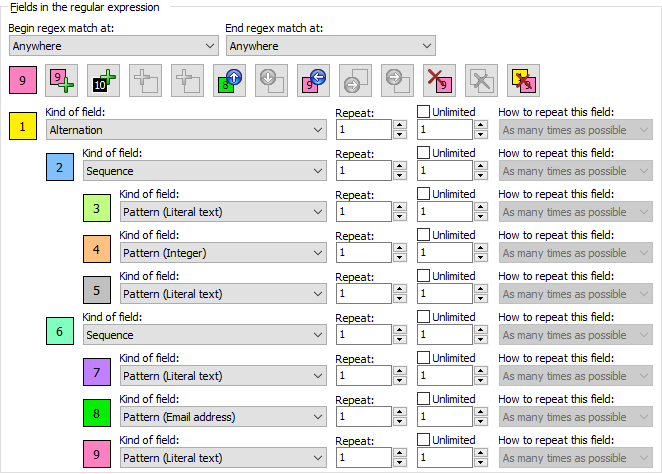
- On the Regex panel, select “C# (.NET 2.0–7.0)” as your application, turn on free-spacing, and turn off mode modifiers. Click the Generate button, and you’ll get this regular expression:
\[
[0-9]+
\]
|
<
[!#$%&'*+./0-9=?_`a-z{|}~^-]+@[.0-9a-z-]+\.[a-z]{2,63}
>
Required options: Case insensitive; Free-spacing.
Unused options: Dot doesn’t match line breaks; ^$ don’t match at line breaks; Numbered capture.
- Because the Samples panel always highlights all regex matches like a “find all” command would, it now shows that our regex matches all the numbers and email addresses with their delimiters:
My favorite number is [42].
You can email me at <joe@fortytwo.com>.
Other nice numbers are [17], [382], and [794].
<joefortytwo@gmail.com> is my alternative email address.
- If you want to get the same results when programming, select one of the functions “get a list of all regex matches in a string” or “use regex object to get a list of all regex matches in a string” on the Use panel. Most of the source code templates that ship with RegexMagic have one of these functions. Some may use the term “array” instead of “list”.
Related Examples
Reference