For this example, we’ll try to match a comma-delimited list of 3 numbers. The 3 numbers must be exactly the same. They can range from -999.999 to +999.999. The decimal digits are mandatory, the sign is optional.
- Click the New Formula button on the top toolbar to clear out all settings on the Samples, Match, and Action panels.
- On the Samples panel, paste in one new sample:
12.374,12.374,12.374
-17.872,-17.872,-17.872
519.878,519.878,519.878
12.374,-17.872,519.878
- On the Match panel, set “begin regex match at” to “start of line”, and set “end regex match at” to “end of line”.
- Again on the Samples panel, select the first number, and click the Mark button. This marks the first number as field
 .
.
- Select the first comma, and click the Mark button to mark it as field
 .
.
- Select the second number, and mark it as field
 .
.
- Mark the second comma as field
 .
.
- Mark the third number as field
 . The first sample has been marked now:
 12.374,12.374,12.374
-17.872,-17.872,-17.872
519.878,519.878,519.878
12.374,-17.872,519.878
- On the Match panel, use the “select field” drop-down list to select field . RegexMagic has correctly detected the “number” pattern for this field. But the settings for the pattern aren’t the ones we want. One sample is not enough for RegexMagic to extrapolate from.
- Set the minimum and maximum values of the integer part to -999 and 999.
- Tick “limit integer part”, “allow plus sign”, “allow minus sign”, and “require integer part”. Clear all the other checkboxes. The pattern should now look like this:
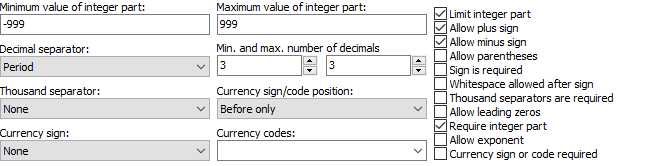
- Use the “select field” drop-down list again to select field . RegexMagic detected the “number” pattern for this field too, which isn’t what we want.
- In the “pattern to match field” drop-down list, select “text matched by another field”.

- Use the “select field” drop-down list again to select field .
- In the “pattern to match field” drop-down list, select “text matched by another field” once more.
- Set the “field validation mode” to “strict”, to make sure the number pattern uses all the settings we made.
- On the Regex panel, select “C# (.NET 2.0–7.0)” as your application, turn on free-spacing, and turn off mode modifiers. Click the Generate button, and you’ll get this regular expression:
^
(?<field1>[+-]?(?:[1-9][0-9]{1,2}|[0-9])\.[0-9]{3})
,
\k<field1>
,
\k<field1>
$Required options: Case sensitive; Free-spacing; ^$ match at line breaks.
Unused options: Dot doesn’t match line breaks; Numbered capture.
- The Samples panel now confirms our regular expression matches the 3 comma-delimited numbers, but only if the 3 numbers are the same:
12.374,12.374,12.374
-17.872,-17.872,-17.872
519.878,519.878,519.878
12.374,-17.872,519.878