Pattern: Control characters
“Control characters” is one of the patterns that you can select on the Match panel. Use this pattern to restrict a field to a certain set of ASCII characters. The repetition settings for the field determine how many characters the field can or must match.
This example shows how you can use the “control characters” pattern to match an identifier in a hypothetical programming language. This language allows identifiers that consist of any combination of letters, digits, dollar signs, and underscores. You can find this example as “Pattern: control characters” in the RegexMagic library.
- Click the New Formula button on the top toolbar to clear out all settings on the Samples, Match, and Action panels.
- On the Samples panel, click the New button to add a new sample and click the FFh button to switch the sample to hexadecimal mode. Then paste this block of bytes into the hex editor:
41 53 43 49 49 20 63 6F  6E 74 72 6F 6C 20 63 68
61 72 61 63 74 65 72 73  3A 00 01 02 03 04 05 06
07 08 09 0A 0B 0C 0D 0E  0F 10 11 12 13 14 15 16
17 18 19 1A 1B 1C 1D 1E  1F
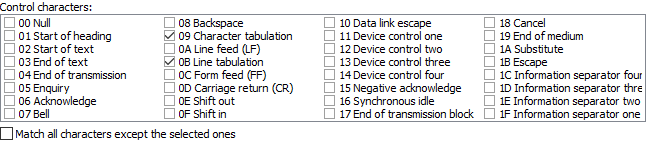
- Select byte 09 in the sample and click the Mark button. RegexMagic automatically adds a field using the control characters pattern with character 0x09 selected.
- Select byte 0B in the sample and click button
 above the sample. RegexMagic adds control character 0x0B to the pattern.
- On the Regex panel, select “C# (.NET 2.0–7.0)” as your application, turn off free-spacing, and turn off mode modifiers. Click the Generate button, and you’ll get this regular expression:
[\t\v]
Unused options: Case sensitive; Exact spacing; Dot doesn’t match line breaks; ^$ don’t match at line breaks; Numbered capture.
Related Examples
Reference