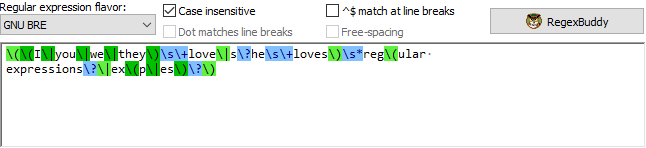
“Regular expression” is one of the patterns that you can select on the Match panel. With this pattern you can insert actual regular expression code into your regular expression.
Select the regular expression flavor this regular expression was created for.
If this flavor is different than the flavor for the final regular expression, RegexMagic will automatically convert the regular expression below before inserting it into the final regular expression.
Turn on to make the dot match absolutely any character, including line breaks.
Turn off the make the dot match any character except line break characters.
Turn on to ignore differences between lowercase and uppercase letters in the regex and subject string. The regex "word" will match "Word", "woRD", etc.
Turn off to treat uppercase and lowercase letters as different letters. The regex "word" will match "word" but not "Word".
Turn on to make the ^ and $ match after and before line breaks embedded in the subject string, as well as at the start and end of the subject. In other words: make ^ and $ match the start and end of a line. Turn off to allow the ^ and $ to match at the start and end of the subject string only.
Turn on to ignore whitespace and comments in the regular expression below.
Turn off to treat whitespace as significant, and the # character as an ordinary character.
Invoke RegexBuddy to edit this regular expression.
Type in or paste in the strings this field should allow.
This control is a full-featured text editor. You can cut, copy and paste with Ctrl+X, Ctrl+C and Ctrl+V as usual. Press Ctrl+Enter to insert a page break when delimiting the list of Regex with page breaks. Press Enter to insert a line break.